
PSN Downloader: CF3B5(working on OFW 4.60)

Let's talk about anything about video games, no matter what platform it is. What is your favorite game? Who is your favorite character? What are the recently released games? What is DLC (downloadable content)? How do I beat this boss? How do I set up my team?
Post Reply
User avatar
acousticghelo
Primal Rage
Primal Rage
Posts: 940
Joined: Wed May 19, 2010 2:24 pm
PSN ID: myshootingstar

The Ps3 ProxyServer is a free program from chinese developer CF3B5 that allows your computer to become a server that handles traffic to your Ps3, it is very easy to use, one needs only to follow these steps:

CLICK this for: VIDEO TUTORIAL
Second video: PS3 LATEST FIRMWARE TUTORIAL

THINGS BE NEEDED BEFORE YOU CAN USE THIS APP:
1. router (should be wired or wifi)
2. Application: http://ps3-proxyserver.software.informer.com/
3. dotnetfx.exe: http://download.microsoft.com/download/ ... tnetfx.exe (install this before installing the application)
4. Internet Download Manager: Download this: https://www.dropbox.com/s/g9d00so299jmm ... ld%208.exe

Install all the above application and you are ready to go.

Working on windows XP, windows 7, and windows 8.
You can also download patches using this application.

STEPS:

On your PC:

1. Download this link http://ps3-proxyserver.software.informer.com/ and download the application.(stated above)
2. You might need this also before installing the above application: http://download.microsoft.com/download/ ... tnetfx.exe (stated above)
3. After installation of the .Netnetwork and the proxy application, go to C:(local disk) > programs files > CF3B5 folder > PS3.ProxyServer > click PS3.ProxyServer.GUI and the application looks like this:
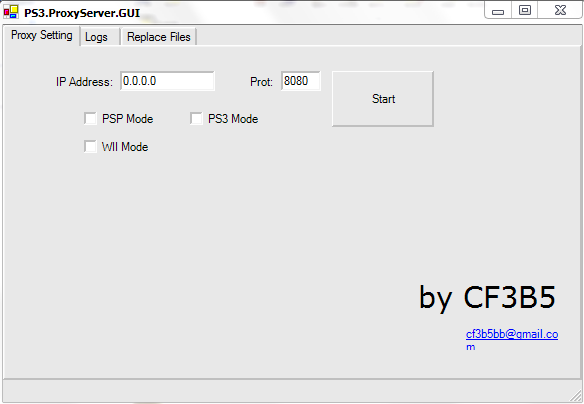
Image
4. Know first your IP address. example: 192.168.0.140
5. Open the application and put your IP address
6. Leave the port 8080 and tick PS3 Mode
7. Click "Start"

On your PS3

1. Go to network settings > internet connection settings
2. Select the method "Custom" > Wired Connection > Auto-detect > IP address seting: automatic > DHCP: Do not set > DNS setting: Automatic > MTU: Automatic > til you see "Proxy server"
3. On "Proxy server", click "use"
4. Put on the Address the IP address you use on the application (example above: 192.168.0.140)
5. Put "8080"on the "Port number"
6. Save the PS3 Network settings.

On PSN store

1. Log in your PSN account the Go to your Download History
2. Click any game you want to download
3. While its activating and downloading, the link on the LOGS on your Proxy application will appear.
Image
4. You can now cancel the downloading game on your PS3.
4. Copy the log. I suggest copy the log and save it to your Notepad and keep the copy of it.

On your PC

1. Paste the copied log to your downloader. I personally use IDM. Paste it on the "Address box" to download and click OK
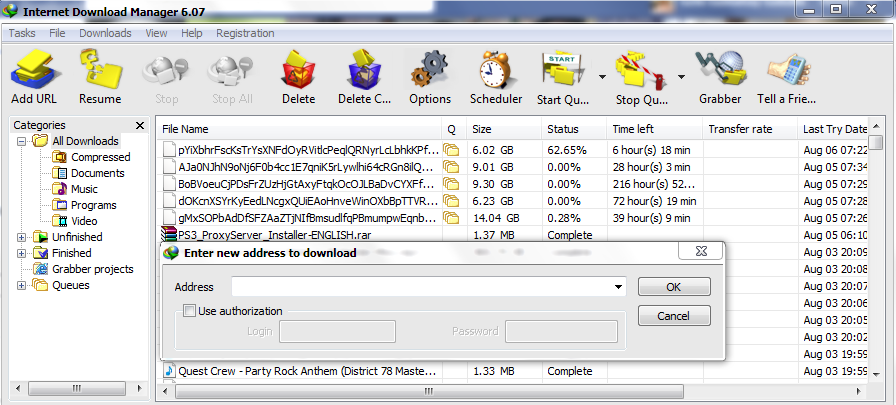
Image
2. Wait and let it download
3. Save the downloaded file(PKG) to your preferred location to your PC.
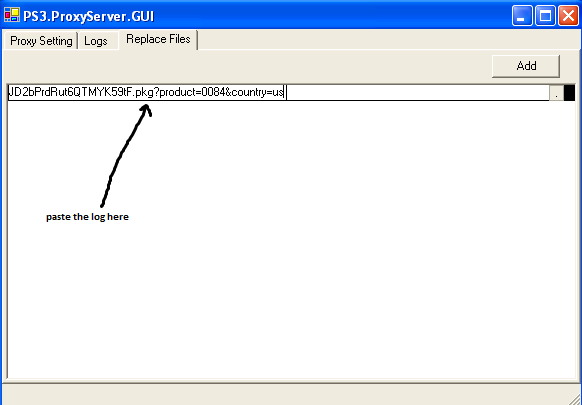
4. On the Proxy application, Click "Add" and two boxes will appear.
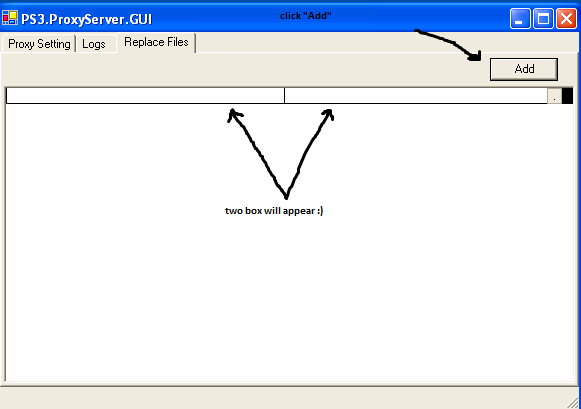
Image
5. First box: Copy and Paste the Log of the PKG file you downloaded. (you save it to your notepad)
Image
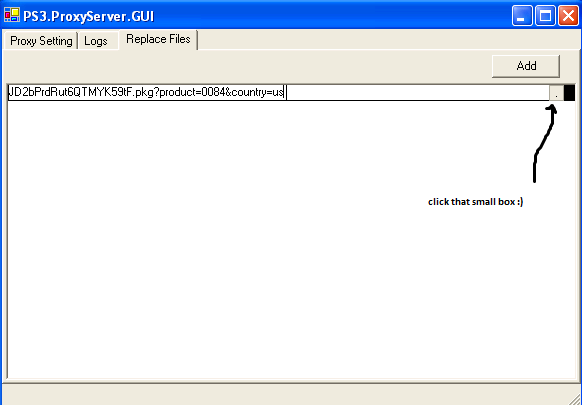
6. Second box: Click the small box
Image
7. Now locate the file from your PC
Image
8. Looks like this. Log and file location pasted.
Image

Going back to your PS3
1. Log in again to your PSN account > go to your Download history
2. Download again the game you downloaded and see how fast it will transfer.
3. Install the game and Enjoy.

FIX for the latest FW update:

CLICK this for the FIX :

Basic steps:

1. background download the game you want to transfer and the pause the download
2. sign out your PSN account
3. get the new link from the LOG(any link)
4. place it on the left box on replace files
5. resume the download then pause
6. do the pause and resume til you see the black text from the log(indication that transferring is working)
7. wait and install the game


ALTERNATIVE WAY by desertfox615

When transferring your .PKG file from LAPTOP/PC to your PS3:

1. tinanggal ko yung Phone Line connection sa Router ko. thats means no internet connection yung PS3 and Laptop
2. close PS3.ProxyServer
3. erase config.xml
4. run PS3.ProxyServer again...dapat clear ang Logs and Replace files.
5. selected the game i want to transfer sa PS3 download management
6. click on Resume
7. monitor the Logs on your laptop. a new link will appear pero wala nang IP addresses
8. use the link from #7 para sa replace files.

GOOGLE DOC - PROXY LINKS (provided by other users)

Last edited by acousticghelo on Sat Jul 26, 2014 7:02 pm, edited 13 times in total.
PSN: acousticghelo

Youtube: my youtube channel

YLOD Current Record : 61 wins / 9 losses
User avatar
lanslans02
Primal Rage
Primal Rage
Posts: 1203
Joined: Thu Dec 30, 2010 4:31 pm
PSN ID: LaNs-Aksh
Location: Bolinao, Pangasinan / Angeles, Pampanga.
Contact:

Salamat sa apps na ito hindi ko na kelangan bugbugin sa puyat ang PS3 ko! ..and grave sumipsip ng DL speed yung IDM, Solve na solve! Thanks gelo! :bigmouth: :win: :agree: :2thumbs:
PSN ID: LaNs-Aksh
Status: 97% RPG Freak.
MY Games & Trophies: exophase / Playfire / PSNProfile
Currently Playing: Dark Souls
----------
PlayHard
----------
User avatar
sinnoh
Motor Toon Grand Prix
Posts: 45
Joined: Tue Jun 05, 2012 8:51 pm

madami pros, pwede ibackup ang digital games, dlc and patches, and tulad ng sabi ni lans, hindi na kailangan nakabukas ps3 mo dahil si pc na ang nag d-download para sayo
User avatar
acousticghelo
Primal Rage
Primal Rage
Posts: 940
Joined: Wed May 19, 2010 2:24 pm
PSN ID: myshootingstar

lanslans02 wrote:Salamat sa apps na ito hindi ko na kelangan bugbugin sa puyat ang PS3 ko! ..and grave sumipsip ng DL speed yung IDM, Solve na solve! Thanks gelo! :bigmouth: :win: :agree: :2thumbs:
oo laking tulong din nung IDM.. kaya sinama ko dyan sa guide.. working sa lahat.. kahit sa kahit anong DL pwede.. :2thumbs:
PSN: acousticghelo

Youtube: my youtube channel

YLOD Current Record : 61 wins / 9 losses
User avatar
kenpachi1427
Primal Rage
Primal Rage
Posts: 1216
Joined: Tue Nov 23, 2010 7:17 pm
PSN ID: gerome827
Location: Color Separation

Tama! ang galing ng apps na to, sobrang dali ng magdL ng mga higanteng games :lol: :2thumbs: bigyan na ng jacket at five thousand na palakpak yang si pareng gelo :rofl: :rofl:
:cheer:
PSN ID: gerome827
ISP: PLDT
User avatar
Jesper
Snatcher
Snatcher
Posts: 769
Joined: Thu Sep 09, 2010 7:26 pm
PSN ID: MadaraJez
Location: Kepler 22-b

ito parin ginagamit ko hanggang ngayon, laking tulong talaga nito. :agree:

PSN ID : MadaraJez
Pinoy PS3 Trophy Leaderboard

dynamic trophy ranking for PinoyPS.com
kryst abegnalie
Jumping Flash!
Jumping Flash!
Posts: 238
Joined: Sun Feb 08, 2009 12:48 am

Eto rin gamit ko, mas mabisa hehehe at nagagamit yung current idm ko
User avatar
acousticghelo
Primal Rage
Primal Rage
Posts: 940
Joined: Wed May 19, 2010 2:24 pm
PSN ID: myshootingstar

now downloading Max Payne 3... :2thumbs:
Image
PSN: acousticghelo

Youtube: my youtube channel

YLOD Current Record : 61 wins / 9 losses
User avatar
kenpachi1427
Primal Rage
Primal Rage
Posts: 1216
Joined: Tue Nov 23, 2010 7:17 pm
PSN ID: gerome827
Location: Color Separation

^ ang bilis pala ng dL speed mo pldt ba yan hehe :2thumbs:
PSN ID: gerome827
ISP: PLDT
User avatar
acousticghelo
Primal Rage
Primal Rage
Posts: 940
Joined: Wed May 19, 2010 2:24 pm
PSN ID: myshootingstar

kenpachi1427 wrote:^ ang bilis pala ng dL speed mo pldt ba yan hehe :2thumbs:
globibo pre.. db dalawa connection ko.. :2thumbs:
PSN: acousticghelo

Youtube: my youtube channel

YLOD Current Record : 61 wins / 9 losses
sirhcuss_v2
PlayStation
PlayStation
Posts: 5
Joined: Mon Nov 26, 2012 8:11 pm
PSN ID: sirhcuss_v2

pafs panu pag dinetect ng Anti virus ko as Trojan yung patch IDM, turn off ko muna you think hehe. :)
User avatar
sinnoh
Motor Toon Grand Prix
Posts: 45
Joined: Tue Jun 05, 2012 8:51 pm

endless20 wrote:now downloading Max Payne 3... :2thumbs:
Image
hehe

Image
User avatar
acousticghelo
Primal Rage
Primal Rage
Posts: 940
Joined: Wed May 19, 2010 2:24 pm
PSN ID: myshootingstar

sirhcuss_v2 wrote:pafs panu pag dinetect ng Anti virus ko as Trojan yung patch IDM, turn off ko muna you think hehe. :)
yep.. off mo muna.. pagka-install mo, wag mong iuupdate yung IDM.. :2thumbs:
PSN: acousticghelo

Youtube: my youtube channel

YLOD Current Record : 61 wins / 9 losses
User avatar
acousticghelo
Primal Rage
Primal Rage
Posts: 940
Joined: Wed May 19, 2010 2:24 pm
PSN ID: myshootingstar

@sinnoh - kaw na! kaw na mabilis ang net! wahahaha!
PSN: acousticghelo

Youtube: my youtube channel

YLOD Current Record : 61 wins / 9 losses
User avatar
acousticghelo
Primal Rage
Primal Rage
Posts: 940
Joined: Wed May 19, 2010 2:24 pm
PSN ID: myshootingstar

VIDEO TUTORIAL added! :2thumbs: :2thumbs: :cheer:
PSN: acousticghelo

Youtube: my youtube channel

YLOD Current Record : 61 wins / 9 losses
pjmph
Arc the Lad
Arc the Lad
Posts: 333
Joined: Sat Dec 01, 2007 9:35 pm
PSN ID: toxictrash11
Location: BULACAN, MANILA

need ba yung ps3 connected thru cable?
IT'S BEST IF YOU DON'T KNOW, IT'S BEST FOR EVERYONE. . .
PSN ID: toxictrash11
pjmph
Arc the Lad
Arc the Lad
Posts: 333
Joined: Sat Dec 01, 2007 9:35 pm
PSN ID: toxictrash11
Location: BULACAN, MANILA

so 3 need ko na cable? 1 modem to router 1 router to ps3 and 1 router to laptop? tama ba? hindi ba pwedeng wifi sa laptop?
IT'S BEST IF YOU DON'T KNOW, IT'S BEST FOR EVERYONE. . .
PSN ID: toxictrash11
User avatar
acousticghelo
Primal Rage
Primal Rage
Posts: 940
Joined: Wed May 19, 2010 2:24 pm
PSN ID: myshootingstar

pjmph wrote:need ba yung ps3 connected thru cable?
yes sir
pjmph wrote:so 3 need ko na cable? 1 modem to router 1 router to ps3 and 1 router to laptop? tama ba? hindi ba pwedeng wifi sa laptop?
yes 3.. pero pwede ang wifi sa pagkaka-alam ko di ko palang nattry. yung IP address na makikita mo sa laptop ang ilalagay mo sa proxy. punta ka ng cmd then type mo ipconfig/all > ipv4 yung kunin mo..
PSN: acousticghelo

Youtube: my youtube channel

YLOD Current Record : 61 wins / 9 losses
desertfox615
Ridge Racer
Ridge Racer
Posts: 55
Joined: Sun Feb 19, 2012 4:12 pm
PSN ID: desertfox615

confirmed yan. ps3 ko connected via wifi. laptop connected din via wifi. 2 demo games about 1.2 GB na nadownload ko sa laptop. nalipat ko na yung isa sa ps3....the other one mamayang gabi naman.
PSN ID: desertfox615
PS3 Slim:CECH-3006B
User avatar
acousticghelo
Primal Rage
Primal Rage
Posts: 940
Joined: Wed May 19, 2010 2:24 pm
PSN ID: myshootingstar

desertfox615 wrote:confirmed yan. ps3 ko connected via wifi. laptop connected din via wifi. 2 demo games about 1.2 GB na nadownload ko sa laptop. nalipat ko na yung isa sa ps3....the other one mamayang gabi naman.
good to hear that.. i'll edit the guide. Thanks! :2thumbs:
PSN: acousticghelo

Youtube: my youtube channel

YLOD Current Record : 61 wins / 9 losses
Post Reply